Temu Price Match vs Price Adjustment: What Is the Difference?
Temu has two separate money-back policies for price differences, and most shoppers have only heard of one. Price Adjustment is one-tap and instant. Price Match compares Temu against other stores, takes about 2 business days, and requires you to submit proof. Here is exactly how each one works — and which one RefundRadar automates for you. If you’ve searched for a “Temu price guarantee,” that umbrella term usually points to one of these two — read on to see which you need.
Two separate policies, one order detail page
When you open an order in the Temu app and tap the after-sales option, you see a "Select a request" menu with two distinct choices: Request a price adjustment and Request a price match. These are not the same thing described two ways. They are genuinely different policies with different rules, different timelines, and different eligible situations.
Most guides online describe only one of them — or, worse, use the terms interchangeably. That is wrong. The confusion matters because the two policies are mutually exclusive per item: once you claim one, the other is no longer available for that purchase.
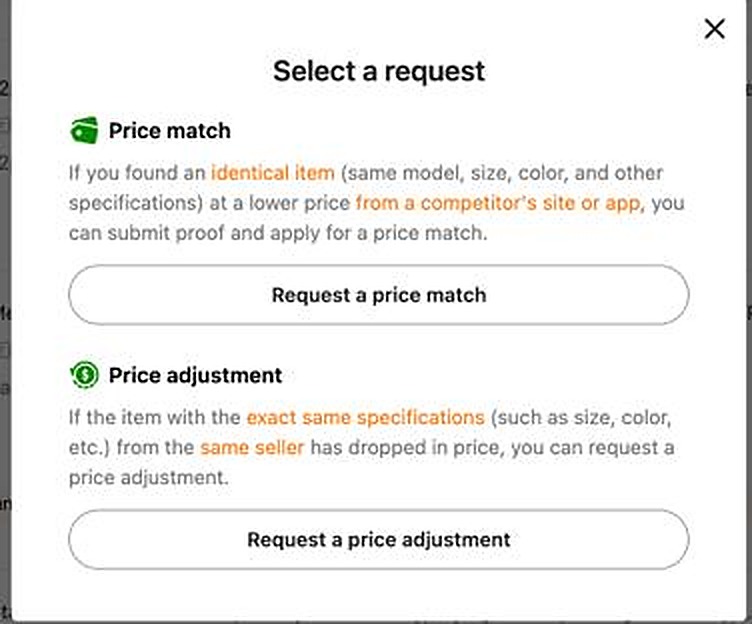
Side-by-side comparison
The quickest way to understand the two policies is to see them together.
| Feature | Price Adjustment Automated by RefundRadar | Price Match |
|---|---|---|
| What triggers it | The same item, from the same seller, drops in price on Temu after your purchase | An identical item is available cheaper on a competitor site or app in the same country |
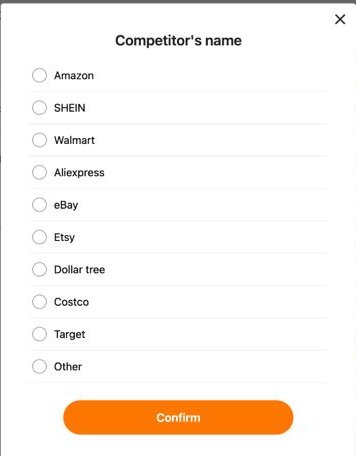
| Eligible competitors | Not applicable — Temu compares against itself | Amazon, SHEIN, Walmart, AliExpress, eBay, Etsy, Dollar Tree, Costco, Target, Other |
| Items sold on Temu | The whole point | Explicitly not eligible as the "competitor" — must be a different platform |
| Proof required | None — Temu checks its own live price automatically | Competitor price in local currency, item URL, and up to 3 screenshots showing name, brand, specs, size, colour, and price |
| How you submit | One tap in the order detail | Two-step form: submit proof, then estimate the price difference |
| Review time | Instant or within a few hours | Approximately 2 business days, manual review |
| Refund destination | Temu Credit (or original payment method) | Temu Credit only (on approval) |
| Request window | 30 days from payment, same country or region | 30 days from payment, same country or region |
| RefundRadar automates this | Yes — fully automatic, runs in the background | No — requires finding a competitor match and generating proof |
Price Adjustment: the one-tap claim
Price Adjustment is the simpler of the two. When Temu drops the price of an item you already bought — from the same seller — you are entitled to the difference back, within 30 days of your original payment.
The process is one tap. Temu checks its own live price automatically, so you do not need to find or submit anything. The refund is typically processed instantly or within a few hours, and it goes to Temu Credit or back to your original payment method.
Temu allows multiple Price Adjustment claims per order as the price keeps dropping. Each eligible drop within the 30-day window can be claimed separately — you are not limited to one claim.
The main limitation of Price Adjustment is that it only applies when Temu's own price drops. If Temu keeps its price steady but a competitor sells the same item for less, Price Adjustment does nothing. That is where Price Match comes in.
Price Match: claiming against a competitor
Price Match is Temu's policy for the other scenario: you find an identical item for less on another platform. If that item is available cheaper on Amazon, Walmart, SHEIN, AliExpress, eBay, Etsy, Dollar Tree, Costco, Target, or a similar retailer, you can ask Temu to refund the difference.
This policy was confirmed live on a Temu Canada account in June 2026. Some external guides claim Temu has no competitor price match — that is incorrect for Canada. Whether the policy exists in the UK, US, Australia, or other regions has not been confirmed.
What counts as a valid match
Temu applies strict criteria. The competitor item must be:
- Identical — same name, brand, specifications, model, size, material, colour, and quantity. A generic item on Temu cannot be matched against a branded equivalent at another store.
- In stock and available for purchase in the same country or region as your Temu order.
- Publicly priced — the price must be available to all customers, not a member-only rate, coupon, flash sale, limited-stock price, or promotional discount.
- Accessible during review — the page must be live (not behind a login) when Temu's team checks it.
What prices are excluded
Temu will not approve a Price Match based on prices that require coupons, that are part of flash or limited-time sales, that offer quantity discounts, or that are available only through cashback or referral programs. Prices flagged as abnormally low or likely errors are also excluded. Black Friday and similar one-day sale prices are excluded.
Limits on Price Match claims
On Temu Canada, Price Match has the following limits (confirmed from the live policy page):
- Only one price-difference refund per item per order.
- Monthly cumulative limit of CA$200 in refunds, up to 10 requests for the same item across different orders.
- Monthly cumulative limit of CA$500 per user account.
How to request a Price Match on Temu
If you do find a genuine identical item cheaper on a supported competitor, here is how to submit the request within your 30-day window.
-
1Find an identical item cheaper on a supported competitorSearch for the exact item — same name, brand, specs, model, size, material, and colour — on Amazon, Walmart, SHEIN, AliExpress, eBay, Etsy, Dollar Tree, Costco, Target, or another retailer. The price must be publicly listed (not behind a login or coupon) and the item must be in stock in the same country as your Temu order.
-
2Take the required screenshots before anything changesCapture up to 3 screenshots of the competitor listing. They must clearly show the item's name, brand, specifications, model, size, material, colour, price, and sales volume if displayed. Do this before proceeding — prices and stock can change, and Temu needs the evidence to be current when they review it.
-
3Open your Temu order and select Price MatchGo to your order in the Temu app within 30 days of payment. Tap the after-sales button, then choose "Request a price match" from the menu. Select the specific item you are claiming for. If the item has already had a Price Adjustment claim filed, it will appear greyed out — the two policies are mutually exclusive.
-
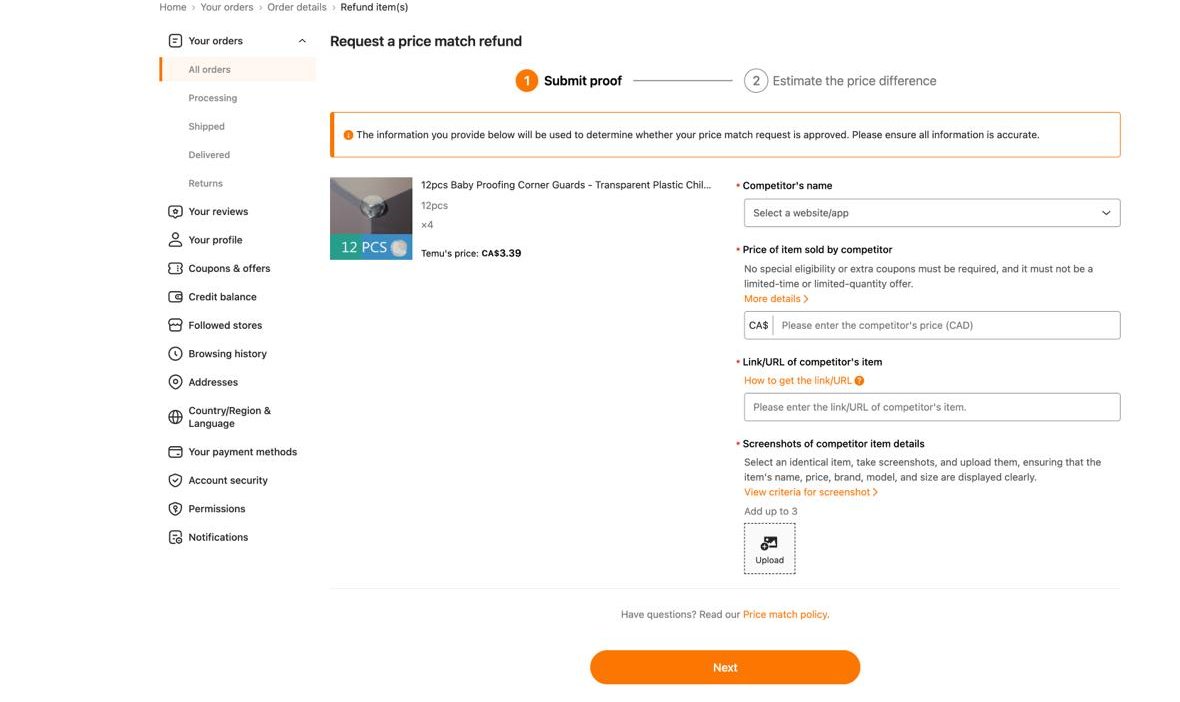
4Submit your proofChoose the competitor from the dropdown, enter their price in your local currency, paste the item's URL, and upload your screenshots. Then complete the second step: estimating the price difference. Submit the request.
-
5Wait approximately 2 business daysTemu reviews Price Match requests manually. If approved, the difference is refunded as Temu Credit. If partially approved, you may receive a partial refund. If declined, you will see a reason. Fraudulent proof can result in your account losing eligibility for future Price Match claims.
The rule you must know: you can only choose one
This is the most important practical detail: Price Adjustment and Price Match are mutually exclusive per item.
If a Price Adjustment refund has been issued on an item, that item is no longer eligible for Price Match. In Temu's own app, the item appears greyed out in the Price Match flow with the message "A price adjustment refund has already been issued." The same applies in reverse: if you claim Price Match first, Price Adjustment is no longer available for that item.
This means that if you ever plan to try a Price Match, you should not file a Price Adjustment on that item first, even if a drop is available. Decide which claim makes more sense for that specific item, then claim only that one.
Which one should you use?
In practice, Price Adjustment is the right default for almost every item. Here is why.
Temu is designed to compete on price. For most of the generic and unbranded items Temu sells, there is no identical item on Amazon or Walmart at a lower price — Temu is already the cheapest. The "identical item" requirement further narrows the field: branded or named-model items are the exception on Temu, not the rule. When we checked real items from a Canada order in June 2026, both eligible items were cheaper on Temu than on any major competitor.
Price Adjustment, by contrast, requires nothing from you. Temu's own price drops are common — items regularly reprice in the days after a purchase. RefundRadar monitors this automatically and claims the difference the moment a qualifying drop appears. There is no proof to gather, no manual review to wait for, and no risk of rejection.
Price Match is worth considering in one specific situation: you bought an item that has a clear, identical branded equivalent (same model number, same specs) at a named retailer, and that retailer's regular everyday price is lower than what you paid on Temu. Even then, the 2-business-day manual review and the strict proof requirements make it a slower, less reliable path than a Price Adjustment claim.
For more detail on how Price Adjustment works and what qualifies, see the full guide to requesting a Temu price adjustment and the Temu price adjustment policy. If you are looking at a broader overview of all the ways to get money back from Temu, the Temu refund guide covers every route. If a price dropped right after your purchase, the price dropped after purchase guide walks through exactly what to do.
Frequently asked questions
Is a “Temu price guarantee” the same as price match or price adjustment?
“Price guarantee” isn’t an official Temu label — shoppers use it for two different things, so it helps to know which you mean:
Price Adjustment — Temu drops its own price on something you already bought. One-tap, no proof, usually instant. See the price adjustment guide.
Price Match — an identical item is cheaper on a competitor like Amazon or Walmart. You submit proof and it takes about 2 business days. Either way, the difference comes back as Temu Credit within 30 days of payment.
Does Temu do price matching against other stores?
Yes. Temu has a Price Match policy (confirmed on Temu Canada in June 2026) that allows you to request a refund of the price difference if you find an identical item cheaper on a supported competitor — Amazon, Walmart, SHEIN, AliExpress, eBay, Etsy, Dollar Tree, Costco, Target, or Other.
You need to submit the competitor's price, item URL, and screenshots. Temu reviews the request manually over approximately 2 business days. If approved, any refund is paid as Temu Credit. The request must be made within 30 days of payment.
Whether this policy exists in the UK, US, Australia, or other regions has not been confirmed. Many external guides incorrectly claim Temu has no competitor price match — they are describing Canada incorrectly.
What is the difference between Price Adjustment and Price Match on Temu?
Price Adjustment applies when Temu itself drops the price of an item you already bought from the same seller. It is one-tap, requires no proof, and is typically processed instantly or within hours. Refunds go to Temu Credit or back to your original payment method.
Price Match applies when an identical item is cheaper on a competitor platform. It requires you to submit proof and takes approximately 2 business days for manual review. Refunds are paid as Temu Credit only.
The two are mutually exclusive per item — once you claim one, the other is no longer available for that purchase.
Can I use both Price Adjustment and Price Match on the same item?
No. The two policies are mutually exclusive per item. If you receive a Price Adjustment refund on an item, that item is no longer eligible for Price Match. The same applies in reverse. You must choose one or the other for each item. Temu's app shows items that have already been adjusted as greyed out in the Price Match flow.
How long does a Temu Price Match request take?
Approximately 2 business days for a manual review. By contrast, a Price Adjustment on the same item dropped in price on Temu is typically instant or within a few hours, with no review needed.
What competitors does Temu accept for Price Match?
On Temu Canada, the competitor dropdown includes Amazon, SHEIN, Walmart, AliExpress, eBay, Etsy, Dollar Tree, Costco, Target, and Other. Items sold on Temu itself are explicitly not eligible as the comparison competitor.
Does RefundRadar automate Temu Price Match?
No. RefundRadar automates Price Adjustment only — claims for when the same item drops in price on Temu. Price Match requires finding an identical competitor listing, generating compliant proof, and surviving a manual 2-day review. That process cannot be automated in the same way Price Adjustment can.
RefundRadar focuses on Price Adjustment because it is faster, requires no proof, and covers the vast majority of refund opportunities that Temu shoppers currently miss. The free app is on iOS and Android.
Is Temu Price Match available in the UK, US, or Australia?
This has not been confirmed. The details in this guide are based on a live Temu Canada account session in June 2026. We have not verified whether the Price Match option appears in the order detail for UK, US, Australian, or other regional accounts. If you can see a "Request a price match" option in your order, the process should be similar to what is described here — but the exact policy limits and eligible competitors may differ.
Seeing Price Match in your country? Email us screenshots and we'll be happy to update this guide with confirmed details for your region — and we'll look at supporting Price Match in the app for markets where it makes sense.