Temu ClaimCredit & Credit Back Calculator: How to Get the Best Discount
Temu’s ClaimCredit offer — shown on-screen as Credit Back, and the “reimbursement offer” a lot of shoppers search for — comes down to one confusing question: how much do you actually have to spend to unlock the credit? Instead of a web calculator you’d hand-feed numbers into, the free RefundRadar app is the calculator — it reads your live offer and shows the exact spend to hit the full reward. Here’s what that looks like.
What Temu ClaimCredit / Credit Back really is
If you’ve been searching for a Temu reimbursement offer, you’ve almost certainly met ClaimCredit — the promo Temu shows on-screen as Credit Back. The deal is simple: Temu gives you store credit for spending, a percentage of your order back, up to a cap.
The confusing part is that the big headline number isn’t free money. You have to spend to unlock it — and how much you spend to reach the full reward is different for every account and every offer. That’s the number people reach for a calculator to work out.
That’s actually why we built this. Reddit’s Temu communities are full of shoppers puzzling over exactly this. One r/TemuThings thread, “Temu Credit Back explanation”, has someone staring at a “spend over $40, get 270% cash bonus” offer and simply asking “what does this mean?”; another, “credit back 420%?”, asks how “spend $165, get $146 back” is supposed to work. Little wonder — a real Credit Back screen stacks tiers like 30% / 70% / 200%, with a ticking countdown and a per-order cap. The numbers are fiddly and shift per account, so nobody has a clean answer. We figured if the maths is what everyone’s stuck on, the app should just do it for you. So we did.
(ClaimCredit / Credit Back is one of several Temu credit promos. Others — like WinCredit — work differently and hide their rules, so this calculator doesn’t cover them yet. See the note at the top.)
The calculator that lives in the app
Here’s the shortcut: you don’t need to do the math, and you don’t need to type anything into a web form. The free RefundRadar app has a Coupons & offers screen that finds your live Temu Credit Back offer and works the numbers out for you.
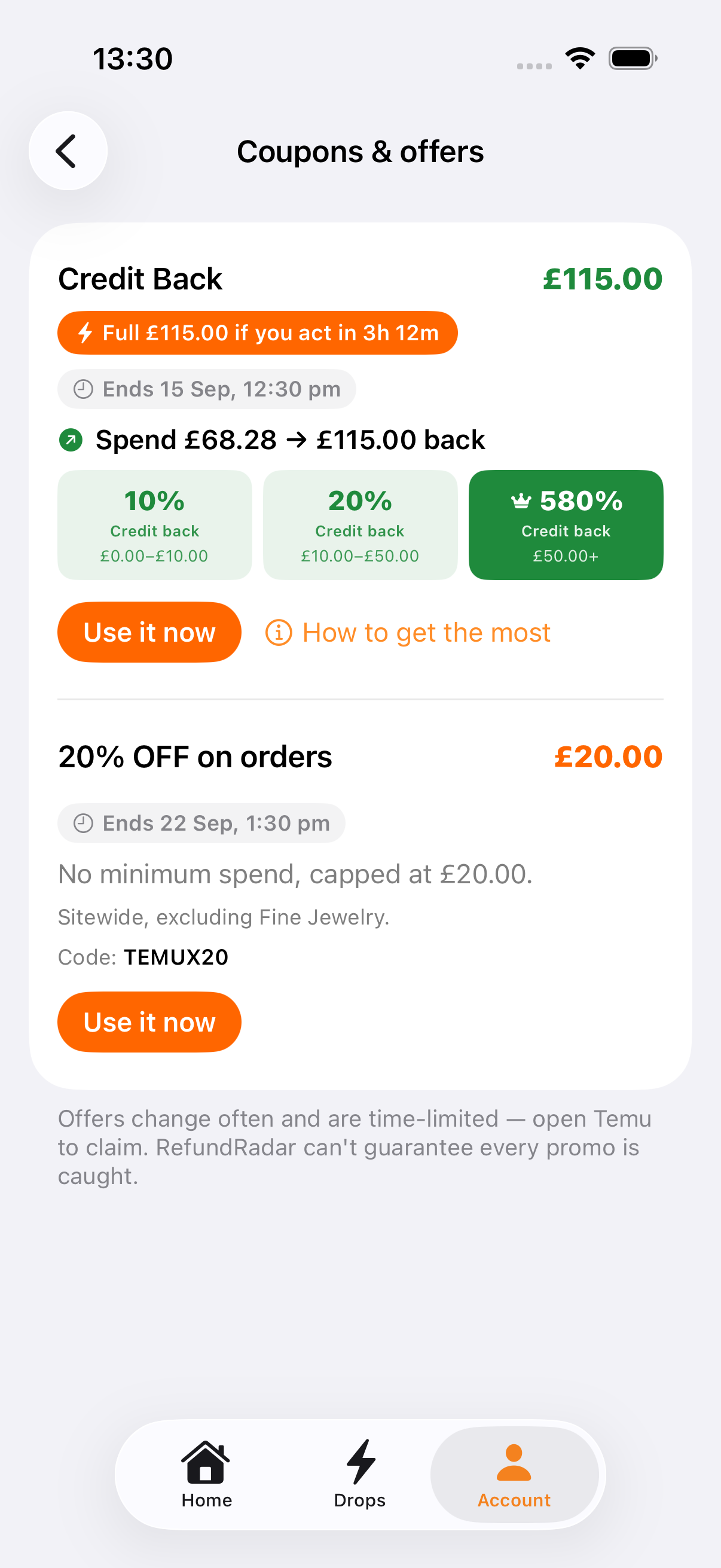
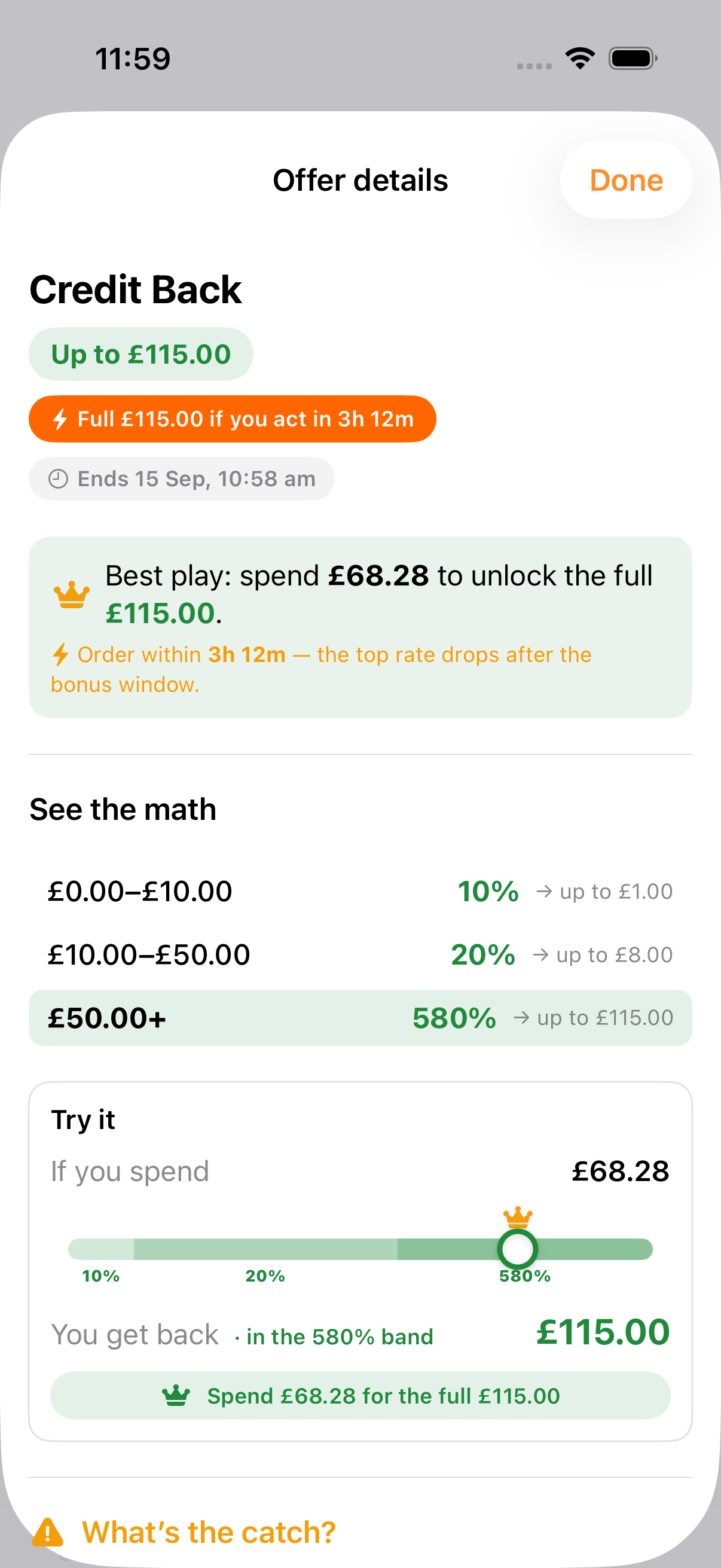
Tap How to get the most on the offer and the app turns into a proper calculator — the exact best play, the full rate ladder, and a slider you can move to see what any spend returns:
How the spend-to-unlock math works
Credit Back offers are tiered: the more you spend, the higher the percentage you earn back, up to a cap. In the example above the ladder is:
- £0–£10 → 10% back
- £10–£50 → 20% back
- £50+ → a much higher rate that tops the reward out at the £115 cap
Because the top band does most of the work, there’s a single spend that reaches the cap exactly — here, £68.28. Spend less and you leave credit on the table; spend more and you’re past the cap, earning nothing extra. That break-even is precisely what the app’s best play line gives you, with no arithmetic on your side.
Is it worth it? Read the catch
A Credit Back offer is worth it only if you were going to spend roughly that much on Temu anyway. Treat the credit as a rebate on things you already planned to buy and it’s a genuinely good discount. Spend extra just to hit the threshold and you’ve turned a “reward” into a cost.
Two catches decide it, and the app spells both out so you’re not guessing:
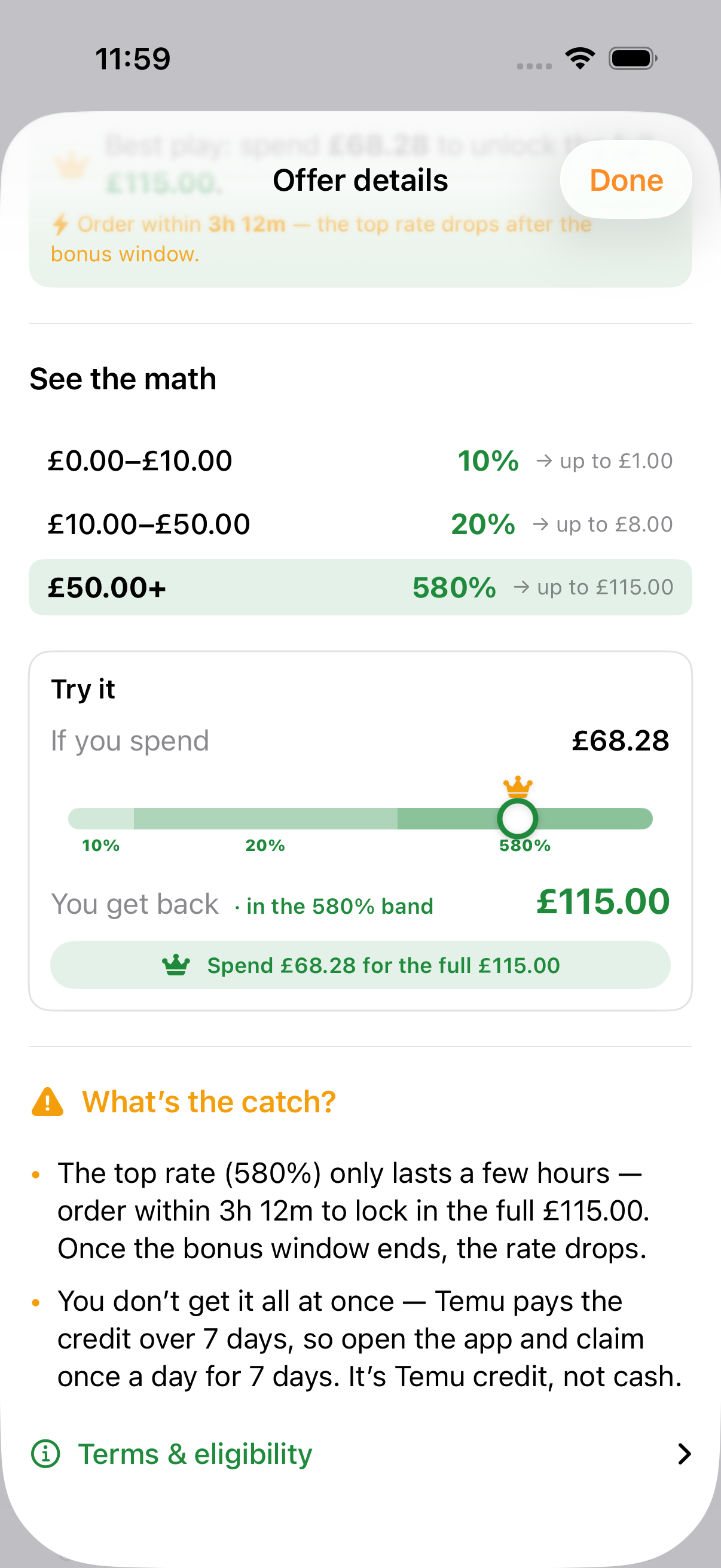
- The window. The top rate is usually a bonus that only lasts a few hours. Order inside it and you lock in the full reward; miss it and the same spend returns less.
- The payout. Many offers drip the credit out over several days — you open the app and claim each instalment — and it’s Temu credit, not cash.
See your own offer in the app
Your offer won’t look exactly like the example here — the amounts, rates and windows are set per account and change while a promo runs. The point of the app is that it reads your live offer and shows your best play, so you always know the exact spend before you buy.
Getting your offer to show up takes two quick steps:
- Accept the offer in Temu first. A ClaimCredit / Credit Back offer only goes live once you’ve opened and accepted it in the Temu app — until then there’s nothing for the calculator (or you) to work with.
- Then check RefundRadar. Open Account → Coupons & offers and the app checks for you automatically (about once a day, and whenever it scans your orders). To check right now, just pull down to refresh on that screen.
For how these credit promos interact with price-adjustment refunds — and why claiming an adjustment too early can reverse your credit — see WinCredit & ClaimCredit: don’t lose your credit.
Frequently asked questions
What is Temu ClaimCredit / Credit Back?
ClaimCredit — shown on-screen as “Credit Back” — is one of Temu’s credit-back promos, and the one people often mean when they search for a Temu “reimbursement offer”. It rewards you with Temu credit for spending on qualifying orders, a percentage back up to a cap. The catch is the headline figure isn’t free cash: you have to spend to unlock it, and the amount you must spend varies by account and offer.
Does RefundRadar have a Temu Credit Back calculator?
Yes — it’s built into the free app rather than a web page, as a new and experimental feature. When Temu shows you a ClaimCredit / Credit Back offer, the app’s Coupons & offers screen reads the offer’s own rate ladder and shows the exact spend to unlock the full reward, plus a slider to see what any spend returns. You don’t type numbers in — it reads them from your live offer.
Why isn’t my Temu Credit Back offer showing in RefundRadar?
A ClaimCredit / Credit Back offer only goes live once you’ve opened and accepted it in the Temu app first — before that there’s nothing for the app to read. Once you have, open Account → Coupons & offers: RefundRadar checks automatically about once a day and whenever it scans your orders, and you can pull down to refresh to check right away. It’s also a new, experimental feature, so it can’t catch every Temu promo yet.
How much do I need to spend to unlock my Temu Credit Back reward?
It depends on the offer’s tiers. Higher spend brackets earn a higher percentage up to a cap, so there’s usually a single spend that lands the reward exactly on its cap — for example, about £68 to unlock a £115 Credit Back reward. RefundRadar reads the ladder from your live offer and shows that “best play” spend for you.
Is a Temu ClaimCredit / Credit Back offer worth it?
Only if you were going to spend roughly that much on Temu anyway. Treat the reward as a rebate on planned purchases: good when the credit discounts things you needed, a spend trap when you buy extra just to hit the threshold. The app shows the spend and the reward together so you can decide before you commit.
Why does a Temu Credit Back offer have a time limit?
The top rate is often a bonus that only lasts a few hours. Order within the window and you lock in the full reward; once it closes the rate drops and the same spend returns less. The credit is also paid out over several days, so you claim it in the app across that period.
Does the calculator work for WinCredit too?
Not yet. WinCredit is a different Temu promo — a coupon-bundle offer with its own mechanics — and its rules aren’t exposed the way ClaimCredit / Credit Back’s are, so the app can’t reliably calculate it. This feature is new and experimental, and for now it works for ClaimCredit / Credit Back offers. We may add more promo types over time.